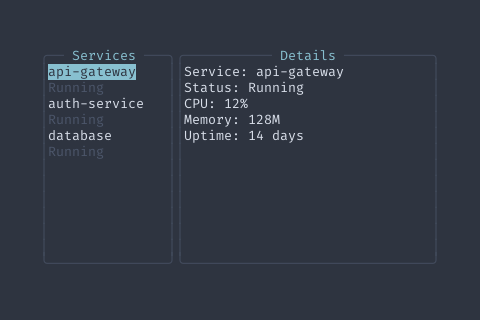
AddHint | func (m *MasterDetailView) AddHint(key, description string) *MasterDetailView | AddHint adds a single key hint. |
ClearHints | func (m *MasterDetailView) ClearHints() *MasterDetailView | ClearHints removes all key hints. |
ClearSearch | func (m *MasterDetailView) ClearSearch() *MasterDetailView | ClearSearch clears the search text and resets the title. |
ConfigureEmpty | func (m *MasterDetailView) ConfigureEmpty(icon, title, message string) *MasterDetailView | ConfigureEmpty sets all empty state properties at once. |
EnableSearch | func (m *MasterDetailView) EnableSearch(showSearchFunc func(currentText string, callbacks SearchCallbacks)) *MasterDetailView | EnableSearch enables the built-in search functionality.
When enabled, pressing '/' will trigger the search UI and the title
will update to show the current search term (e.g., "Workflows (/term)").
The showSearchFunc is called to display the search UI. It receives the
current search text and callbacks for handling user input.
Example usage:
view.EnableSearch(func(current string, cb components.SearchCallbacks) {
app.ShowFilterMode(current, FilterModeCallbacks{
OnChange: cb.OnChange,
OnSubmit: cb.OnSubmit,
OnCancel: cb.OnCancel,
})
}) |
FocusDetail | func (m *MasterDetailView) FocusDetail() *MasterDetailView | FocusDetail focuses the detail pane. |
FocusMaster | func (m *MasterDetailView) FocusMaster() *MasterDetailView | FocusMaster focuses the master pane. |
GetDetailContent | func (m *MasterDetailView) GetDetailContent() core.Widget | GetDetailContent returns the detail panel's content (may be nil). |
GetMasterContent | func (m *MasterDetailView) GetMasterContent() core.Widget | GetMasterContent returns the master panel's content. |
GetRatio | func (m *MasterDetailView) GetRatio() float64 | GetRatio returns the current split ratio. |
GetSearchText | func (m *MasterDetailView) GetSearchText() string | GetSearchText returns the current search text. |
HandleKey | func (m *MasterDetailView) HandleKey(ev *tcell.EventKey) bool | HandleKey processes a key event for the MasterDetailView. |
HandleSearchKey | func (m *MasterDetailView) HandleSearchKey(event *tcell.EventKey) bool | HandleSearchKey checks if the event is a search trigger and handles it.
Returns true if the event was handled. |
HideDetail | func (m *MasterDetailView) HideDetail() *MasterDetailView | HideDetail hides the detail pane, showing only the master. |
Hints | func (m *MasterDetailView) Hints() []KeyHint | Hints returns the configured key hints plus built-in hints. |
IsDetailVisible | func (m *MasterDetailView) IsDetailVisible() bool | IsDetailVisible returns whether the detail pane is visible. |
IsMasterFocused | func (m *MasterDetailView) IsMasterFocused() bool | IsMasterFocused returns whether the master pane is focused. |
IsSearchEnabled | func (m *MasterDetailView) IsSearchEnabled() bool | IsSearchEnabled returns whether search is enabled. |
SetDetailContent | func (m *MasterDetailView) SetDetailContent(content core.Widget) *MasterDetailView | SetDetailContent sets the detail panel's content.
Pass nil to show the empty state or placeholder. |
SetDetailPlaceholder | func (m *MasterDetailView) SetDetailPlaceholder(content core.Widget) *MasterDetailView | SetDetailPlaceholder sets a custom placeholder to show when detail content is nil.
This overrides the default EmptyState component. |
SetDetailTitle | func (m *MasterDetailView) SetDetailTitle(title string) *MasterDetailView | SetDetailTitle sets the detail panel's title. |
SetDetailVisible | func (m *MasterDetailView) SetDetailVisible(visible bool) *MasterDetailView | SetDetailVisible sets detail pane visibility. |
SetEmptyIcon | func (m *MasterDetailView) SetEmptyIcon(icon string) *MasterDetailView | SetEmptyIcon sets the icon shown in the empty state. |
SetEmptyMessage | func (m *MasterDetailView) SetEmptyMessage(message string) *MasterDetailView | SetEmptyMessage sets the message shown in the empty state. |
SetEmptyTitle | func (m *MasterDetailView) SetEmptyTitle(title string) *MasterDetailView | SetEmptyTitle sets the title shown in the empty state. |
SetHints | func (m *MasterDetailView) SetHints(hints []KeyHint) *MasterDetailView | SetHints sets the key hints for this view. |
SetMasterContent | func (m *MasterDetailView) SetMasterContent(content core.Widget) *MasterDetailView | SetMasterContent sets the master panel's content. |
SetMasterTitle | func (m *MasterDetailView) SetMasterTitle(title string) *MasterDetailView | SetMasterTitle sets the master panel's title.
If search is enabled, this also updates the base title used for search display. |
SetMinSize | func (m *MasterDetailView) SetMinSize(size int) *MasterDetailView | SetMinSize sets the minimum pane size in columns. |
SetOnDetailToggle | func (m *MasterDetailView) SetOnDetailToggle(fn func(visible bool)) *MasterDetailView | SetOnDetailToggle sets a callback for when detail visibility changes. |
SetOnResize | func (m *MasterDetailView) SetOnResize(fn func(ratio float64)) *MasterDetailView | SetOnResize sets a callback for when the split ratio changes. |
SetOnSearch | func (m *MasterDetailView) SetOnSearch(fn func(query string)) *MasterDetailView | SetOnSearch sets a callback that fires when the search text changes (live filtering). |
SetOnSearchCancel | func (m *MasterDetailView) SetOnSearchCancel(fn func()) *MasterDetailView | SetOnSearchCancel sets a callback that fires when search is cancelled (Escape pressed). |
SetOnSearchSubmit | func (m *MasterDetailView) SetOnSearchSubmit(fn func(query string)) *MasterDetailView | SetOnSearchSubmit sets a callback that fires when search is submitted (Enter pressed). |
SetOnSelectionChange | func (m *MasterDetailView) SetOnSelectionChange(fn func()) *MasterDetailView | SetOnSelectionChange sets a callback for selection changes in the master list. |
SetOnStart | func (m *MasterDetailView) SetOnStart(fn func()) *MasterDetailView | SetOnStart sets a callback for when the view becomes active. |
SetOnStop | func (m *MasterDetailView) SetOnStop(fn func()) *MasterDetailView | SetOnStop sets a callback for when the view becomes inactive. |
SetRatio | func (m *MasterDetailView) SetRatio(ratio float64) *MasterDetailView | SetRatio sets the split ratio (0.0 to 1.0, proportion of master pane). |
SetResizable | func (m *MasterDetailView) SetResizable(resizable bool) *MasterDetailView | SetResizable enables or disables keyboard resizing. |
SetSearchText | func (m *MasterDetailView) SetSearchText(text string) *MasterDetailView | SetSearchText sets the search text and updates the title. |
ShowDetail | func (m *MasterDetailView) ShowDetail() *MasterDetailView | ShowDetail shows the detail pane. |
ShowSearch | func (m *MasterDetailView) ShowSearch() | ShowSearch triggers the search UI if search is enabled. |
Start | func (m *MasterDetailView) Start() | Start is called when the view becomes active. |
Stop | func (m *MasterDetailView) Stop() | Stop is called when the view becomes inactive. |
ToggleDetail | func (m *MasterDetailView) ToggleDetail() *MasterDetailView | ToggleDetail toggles detail pane visibility. |
ToggleFocus | func (m *MasterDetailView) ToggleFocus() *MasterDetailView | ToggleFocus switches focus between master and detail panes. |