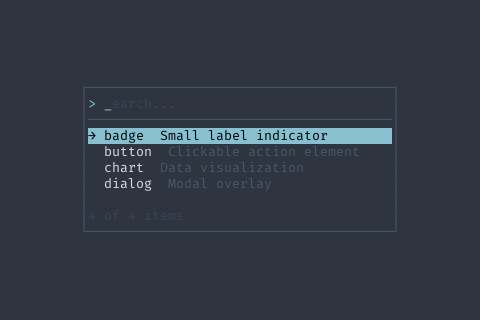
AddRecent | func (f *Finder) AddRecent(id string) *Finder | AddRecent adds an item to recent list |
Clear | func (f *Finder) Clear() *Finder | Clear resets the finder |
ClearRecent | func (f *Finder) ClearRecent() *Finder | ClearRecent clears recent items |
GetFiltered | func (f *Finder) GetFiltered() []FinderItem | GetFiltered returns all items matching current query |
GetQuery | func (f *Finder) GetQuery() string | GetQuery returns current search text |
GetSelected | func (f *Finder) GetSelected() *FinderItem | GetSelected returns currently highlighted item |
HandleKey | func (f *Finder) HandleKey(ev *tcell.EventKey) bool | HandleKey handles keyboard input |
SetCaseSensitive | func (f *Finder) SetCaseSensitive(sensitive bool) *Finder | SetCaseSensitive enables case-sensitive matching |
SetCategories | func (f *Finder) SetCategories(categories []FinderCategory) *Finder | SetCategories defines category ordering |
SetItems | func (f *Finder) SetItems(items []FinderItem) *Finder | SetItems sets the searchable items |
SetMaxVisible | func (f *Finder) SetMaxVisible(max int) *Finder | SetMaxVisible limits visible results |
SetMinScore | func (f *Finder) SetMinScore(score int) *Finder | SetMinScore sets minimum fuzzy match score |
SetOnCancel | func (f *Finder) SetOnCancel(fn func()) *Finder | SetOnCancel is called when Esc is pressed |
SetOnChange | func (f *Finder) SetOnChange(fn func(item FinderItem)) *Finder | SetOnChange is called when selection changes |
SetOnQueryChange | func (f *Finder) SetOnQueryChange(fn func(query string)) *Finder | SetOnQueryChange is called when search text changes |
SetOnSelect | func (f *Finder) SetOnSelect(fn func(item FinderItem)) *Finder | SetOnSelect is called when Enter is pressed on an item |
SetPlaceholder | func (f *Finder) SetPlaceholder(text string) *Finder | SetPlaceholder sets input placeholder text |
SetPreview | func (f *Finder) SetPreview(fn PreviewFunc) *Finder | SetPreview enables preview pane |
SetPreviewRatio | func (f *Finder) SetPreviewRatio(ratio float64) *Finder | SetPreviewRatio sets preview pane width ratio |
SetPrompt | func (f *Finder) SetPrompt(prompt string) *Finder | SetPrompt sets the input prompt |
SetQuery | func (f *Finder) SetQuery(query string) *Finder | SetQuery sets search text programmatically |
SetRecentItems | func (f *Finder) SetRecentItems(ids []string) *Finder | SetRecentItems sets recently used items |
SetShowCategories | func (f *Finder) SetShowCategories(show bool) *Finder | SetShowCategories enables category headers |
SetShowDescription | func (f *Finder) SetShowDescription(show bool) *Finder | SetShowDescription enables description column |
SetShowIcons | func (f *Finder) SetShowIcons(show bool) *Finder | SetShowIcons enables item icons |
SetVimMode | func (f *Finder) SetVimMode(enabled bool) *Finder | SetVimMode enables vim-style navigation (j/k to move, / to search, Esc exits search).
When disabled (default), all typing goes directly to the search query. |