DebugOverlay
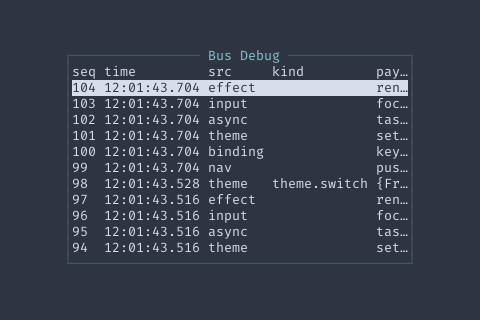
Enable the overlay by setting Debug: true in your AppConfig. That’s it — layout.NewApp wires the rest automatically.
app := layout.NewApp(layout.AppConfig{ Debug: true, // DebugKey defaults to Ctrl+D; override if needed: // DebugKey: tcell.KeyCtrlF1,})When Debug is true, pressing Ctrl+D pushes the overlay onto the page stack. Pressing Esc inside the overlay pops it and returns to the previous view.
Key bindings
Section titled “Key bindings”| Key | Action |
|---|---|
b | Toggle filter: binding source |
t | Toggle filter: theme source |
n | Toggle filter: nav source |
a | Toggle filter: async source |
i | Toggle filter: input source |
e | Toggle filter: effect source |
c | Clear all source filters |
p | Pause / resume live updates |
x | Clear the event list |
Esc | Close the overlay |
Multiple source filters can be active at once; only events matching any active filter are shown. The title bar reflects the current filter set and paused state.
- The overlay enables the event bus on open and restores its prior state on close, so it is safe to open even if you did not call
bus.SetEnabled(true)yourself. - Recent events captured before the overlay opened are backfilled from the ring buffer on start.
- The overlay is constructed with
NewDebugOverlay(0)internally; the zero capacity defaults to 500 events.
Usage
ExampleDebugOverlay constructs the bus-event inspector directly. In a real app you rarely do this — set AppConfig{Debug: true} and press Ctrl+D, which builds and wires the overlay (including SetOnClose to pop the page) for you.
overlay := components.NewDebugOverlay(0)overlay.SetOnClose(func() {  fmt.Println("closed")})
fmt.Println(overlay != nil)
Methods
| Method | Signature | Description |
|---|---|---|
Base | func (d *DebugOverlay) Base() *ComponentBase | Base returns the component base for nav lifecycle integration. |
Hints | func (d *DebugOverlay) Hints() []KeyHint | Hints implements nav.Component. |
Name | func (d *DebugOverlay) Name() string | Name implements nav.Component. |
SetOnClose | func (d *DebugOverlay) SetOnClose(fn func()) *DebugOverlay | SetOnClose registers a callback invoked when the user presses Escape. The application root typically wires this to nav.Pages.Pop. |
Start | func (d *DebugOverlay) Start() | Start implements nav.Component lifecycle. |
Stop | func (d *DebugOverlay) Stop() | Stop implements nav.Component lifecycle. |
Types
type ComponentBase ComponentBase wraps a core.Widget and provides nav.Component implementation.
Use as a field (composition), not embedded, for type-safe access to the underlying primitive.
Example:
type MyView struct {
base *ComponentBase
table *Table
}
func NewMyView() *MyView {
table := NewTable()
v := &MyView{table: table}
v.base = NewComponentBase(table).
SetName("my-view").
SetHints([]KeyHint{{Key: "Enter", Description: "Select"}}).
SetOnStart(v.loadData)
return v
} type KeyHint struct KeyHint represents a single key binding hint. | Field | Type | Description |
|---|---|---|
Key | string | e.g., "Enter", "Esc", "Space", "j/k" |
Description | string | e.g., "Select", "Close", "Toggle" |